App Messages
Mac Permissions
macOS asks before an app can use the microphone, camera or keyboard shortcuts, or share a USB device that macOS is using. This page lists each permission Computle (Remotle) uses, the prompt you see, and where to change it.
| Permission | Needed for | Where to change it |
|---|---|---|
| Microphone | Using your microphone on your workstation | System Settings, Privacy & Security, Microphone |
| Camera | Using your camera on your workstation | System Settings, Privacy & Security, Camera |
| Input Monitoring | Sending system shortcuts, such as Command-Tab, to your workstation | System Settings, Privacy & Security, Input Monitoring |
| Accessibility | Sending system shortcuts to your workstation | System Settings, Privacy & Security, Accessibility |
| Login Items | Sharing USB devices that macOS is using, such as smart card readers and security keys | System Settings, General, Login Items & Extensions |
| Bluetooth | Pairing keyboards, mice and headsets on a kiosk terminal | System Settings, Privacy & Security, Bluetooth |
| Automation | Shut Down and Restart on a kiosk terminal | System Settings, Privacy & Security, Automation |
Until a permission is granted, the rest of Remotle works. Shortcuts stay on this Mac, the microphone or camera stays off, or the USB device stays with macOS.
Microphone and camera
Section titled “Microphone and camera”What you see
The first time Remotle uses them, macOS asks: “Computle (Remotle) needs microphone access to use your microphone on the remote machine.” or “Computle (Remotle) needs camera access to use your webcam on the remote machine.”
If you declined the microphone earlier, Remotle shows: “Computle (Remotle) doesn’t have permission to use the microphone. Open System Settings → Privacy & Security → Microphone, switch on Computle (Remotle), then turn the microphone back on in Settings.” with an Open System Settings button.
What to do
- Click Open System Settings, or open System Settings, Privacy & Security, Microphone (or Camera).
- Switch on Computle (Remotle).
- Press F2 during the session, open Camera and switch the microphone or camera back on.
Reset the microphone permission
Section titled “Reset the microphone permission”If macOS no longer asks, reset the permission so it asks again.
-
Press F2 during a session and open the Local tab.
-
Click Reset microphone permission under Diagnostics.
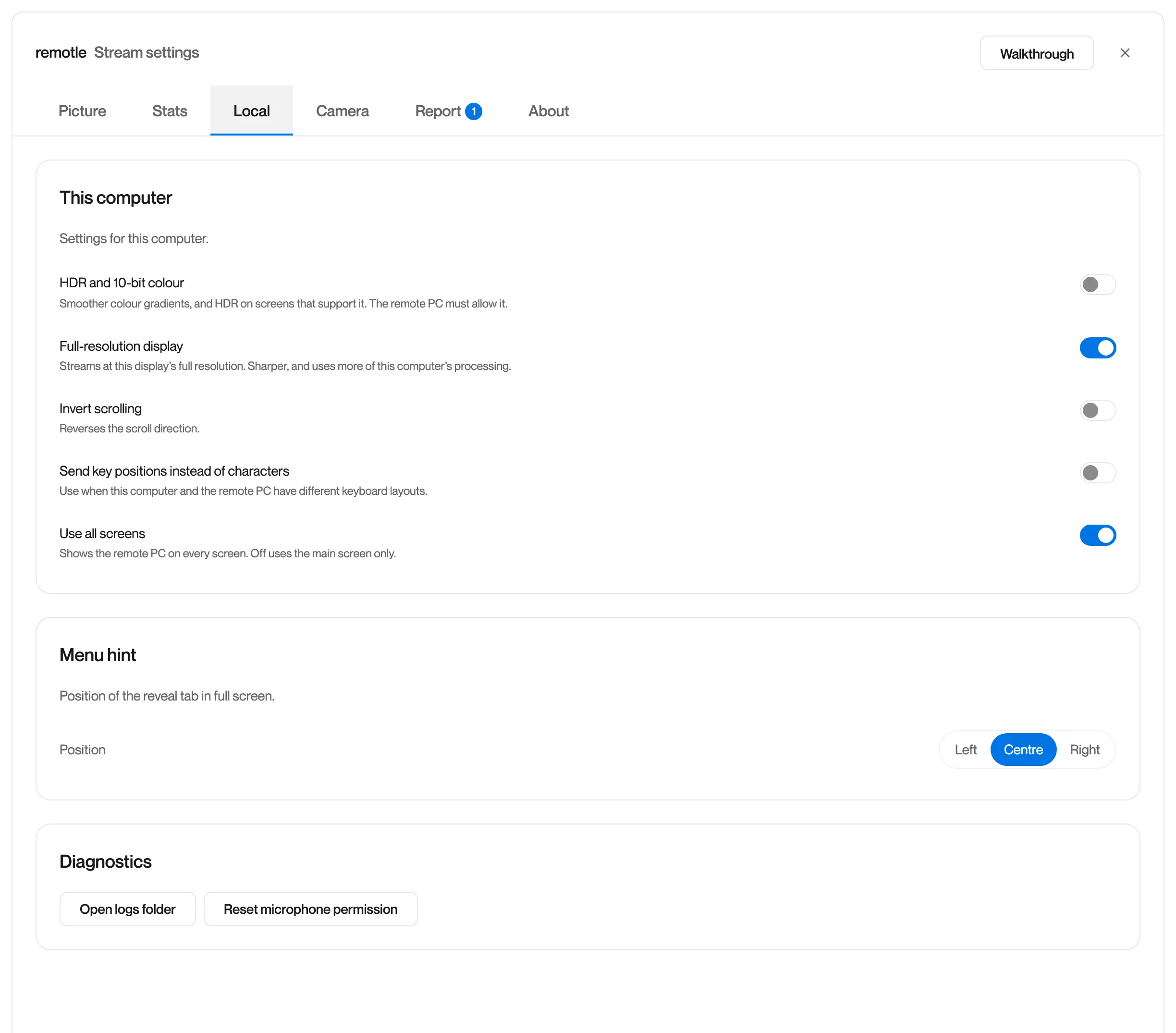
-
Remotle shows “Microphone permission reset. Toggle the Microphone menu item to re-prompt for permission.”
-
Open Camera, switch the microphone off and on. macOS asks again.
Input Monitoring and Accessibility
Section titled “Input Monitoring and Accessibility”What you see
“Input Monitoring access required” or “Accessibility access required” (or both): “Computle (Remotle) needs Input Monitoring and Accessibility permission to send system shortcuts such as Command-Tab to the remote PC. Open System Settings → Privacy & Security → Input Monitoring and Accessibility, switch on Computle (Remotle), then restart Computle (Remotle).” with an Open System Settings button.
After you switch them on: “Restart Computle (Remotle) to send system shortcuts. Input Monitoring and Accessibility are switched on for Computle (Remotle). macOS applies them after the app restarts. Until then, shortcuts such as Command-Tab stay on this Mac.”
What it means
Without these two permissions, Escape and Command still reach the workstation, and system shortcuts such as Command-Tab act on this Mac instead of the workstation.
What to do
- Click Open System Settings, or open System Settings, Privacy & Security.
- Open Input Monitoring and switch on Computle (Remotle).
- Open Accessibility and switch on Computle (Remotle).
- Quit and reopen Computle (Remotle). macOS applies the permissions when the app restarts.
See Keyboard Shortcuts for which shortcuts go to the workstation.
USB devices that macOS is using
Section titled “USB devices that macOS is using”What you see
In the USB menu: “The selected devices are held by macOS and cannot be redirected”, with Allow USB Access for Devices in Use by macOS… or Allow USB access in System Settings…
What it means
macOS is using the device, for example a smart card reader or security key, so Remotle needs a one-time approval before it can share it.
What to do
- Choose Allow USB Access for Devices in Use by macOS… from the USB menu.
- Approve Computle (Remotle) when macOS asks, under System Settings, General, Login Items & Extensions.
- Choose the device again in the USB menu.
See USB Devices.
Kiosk terminals
Section titled “Kiosk terminals”A Mac set up as a kiosk terminal asks for two more permissions during set-up: “Computle (Remotle) asks macOS to shut down or restart when you choose Shut Down or Restart on a kiosk terminal.” and “Computle (Remotle) lists and pairs Bluetooth keyboards, mice and headsets when IT sets up a kiosk terminal.” Approve both so the Shut down, Restart and Bluetooth features of the terminal work. See Kiosk Terminals.